
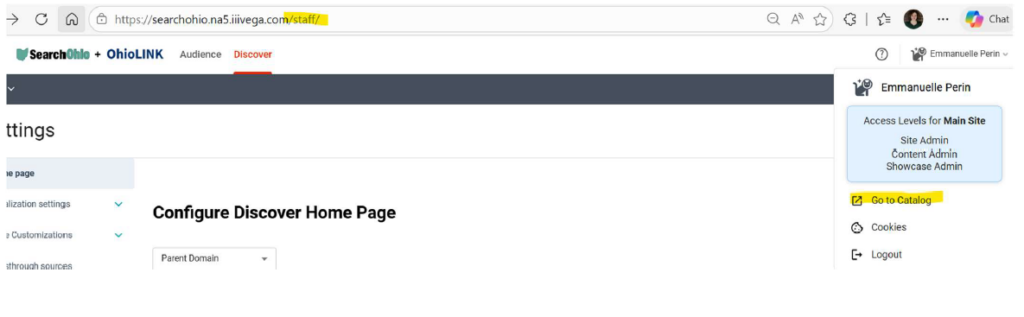
Bookmark the URL for staff use: https://searchohio.na5/iiivega.com/staff/
Vega Patron Assist Functionality PDF
The Steps:
Note: An error will occur if the patron has never before logged into Vega. Follow the steps here to add them as a user on Rapido in order for them to show up in Vega. If you can reset their PIN, that may be preferable for their continued use of the catalog.
- Go to the Admin interface of Vega by adding /Staff at the end of the Vega URL. Then in the menu under your login, select Go to Catalog.
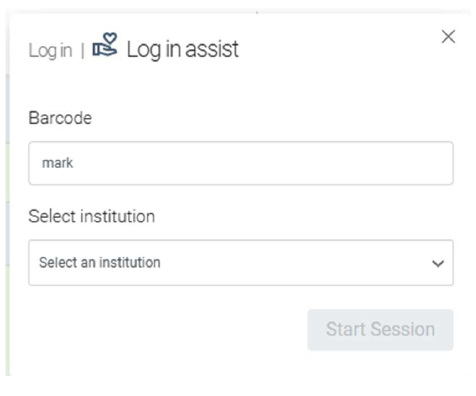
2. In the User panel, choose Patron Assist.
Enter the barcode and select the institution to enter Assist mode.
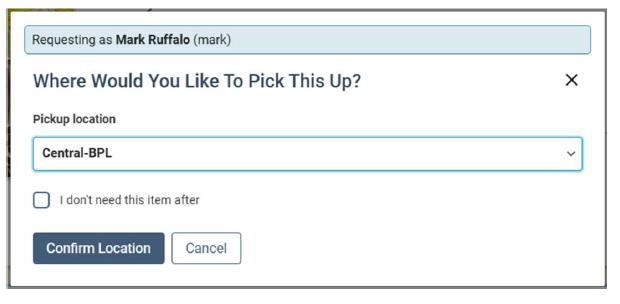
3. The request workflow will show that the staff user is placing a hold for a patron by displaying their name and barcode info on the hold workflow:
These are the expected functionalities:
- Authenticate as a patron using barcode and institution
- Show orange bar around browser screen while in assist mode
- Search Catalog and place a hold on an item for the assisted patron from any Hold Request action button in search or full card views.
- Timeout of Patron Assist mode if idle, to avoid accidental transactions