
Reminders for each ticket system:
- Each ticket or submitted case should be limited to one issue or problem.
- A login is required for each ticket system.
Contact for setting up a clarivate ticket username / password
Contact for setting up a SearchOhio HelpDesk username / password
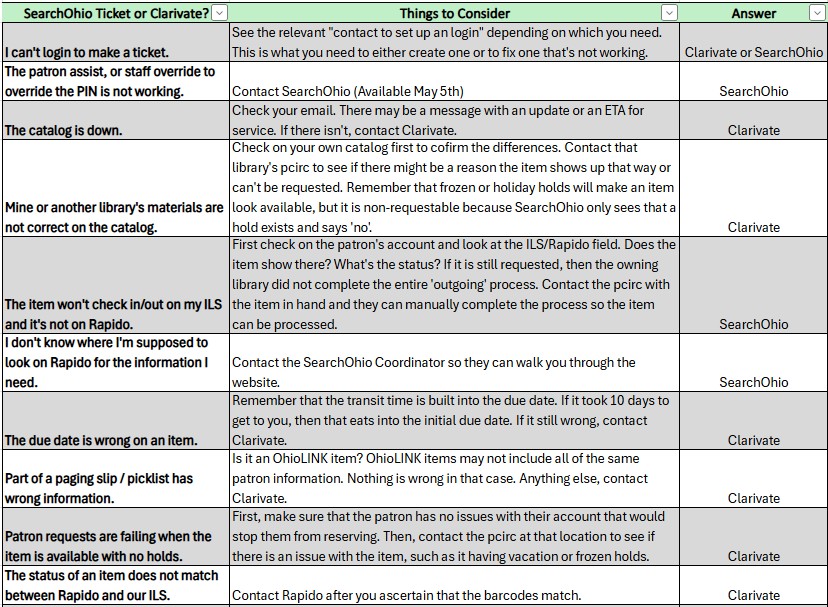
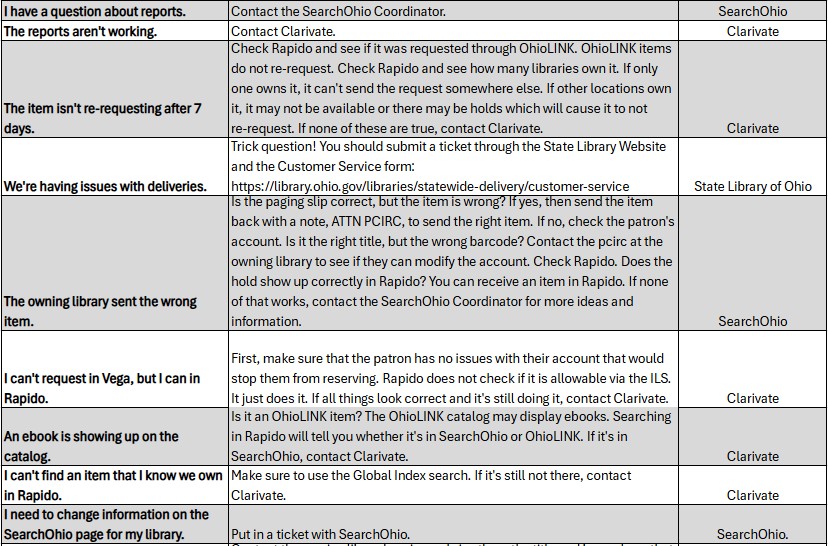
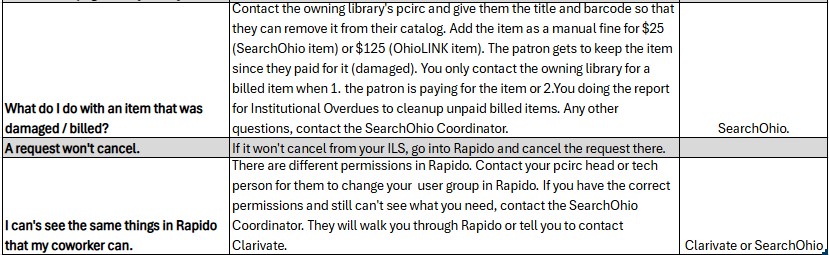
Who Do I Contact?
| Guideline | Questions to Consider | Info to Include |
| Who? | Who saw the problem? Who is affected by the problem? | Define the impact scope: patrons, staff, all users, or specific groups? |
| What? | What is the problem? What is the expected behavior? What was the actual behavior? | 1. Describe the problem and indicate its impact severity. High priority – any of the following: Rapido, Vega (the catalog), or your ILS are down, are unstable, or unusable. A problem occurred which has wide impact to your users. A feature has stopped working or produces erratic results. Your data is no longer reliable. Medium priority: Need clarification on how a feature works or the impact of a particular job. Low priority: A request for advice on a workflow. 2. Describe any troubleshooting you’ve done to resolve the problem including: reading documentation, making configuration changes, etc. 3. Is this a performance problem? 4. Is this a circulation problem? If so, include the patron ID and item barcode. 5. Gather screenshots if you can. Please include the entire screen and – important! – show the browser URL. |
| When? | When does the problem occur? When did the problem start? | Does the problem frequency. Does it occur all the time or randomly? Does it occur only during certain conditions? Does it occur after a job has run? Did it begin after a monthly or quarterly release? Did it begin after a configuration change? If so, describe that change. In Primo, do you see the problem as a guest user or are you logged in? |
| Where? | Where did the problem occur? | At which desk or department, and in which environment did the problem occur, Production or Sandbox? If Sandbox, include the Sandbox URL. In which view? In which record? |
| Why? | What is the background context for your actions? | What have you already done to address the issue and why? Why were you using a particular workflow? Were you trying to replicate a particular ILS workflow or feature? |
| How? | How can the problem be reproduced? How can the problem be resolved? | Describe the steps you took or the workflow used. Include the menu paths to commands or tables. Provide additional details such as transactions which occurred or any custom configurations which could be helpful in understanding the problem. The “resolve” question requires careful thought. Are you looking for instruction on a configuration question? Do you need help understanding how a feature does or does not work? Do you think you’ve hit a bug which should be fixed in a future product release? Is there a policy coded into your configuration that could explain the issue? |