
Materials requested by local patrons arrive via deliveries from Priority. SearchOhio and OhioLINK materials will have a sticker label placed on the front with the owning library’s information, and a paging slip/receipt placed inside the item. Keep the sticker label in place, and hold onto the paging slip until the item is completely processed.
Check the Item In Via DCB
- Open INN-Reach DCB, and click on the “Not My Item Check In” button in the left-hand menu.
2. Click in the blank field and begin scanning items. Most items will scan as-is, but some will require you to type a “b” before scanning them. Some libraries known to have this issue are the University of Akron, and 5-letter barcode items from Toledo-Lucas and Bexley.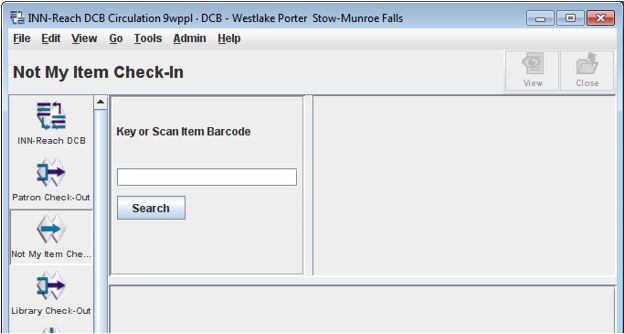
3. A pop-up will display.
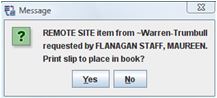
For the most part, you will click “No”. The item will still be checked in as “Received.” Only click “Yes” if the item came without a paging slip and you need the item’s information and requesting patron’s name.
Note: If the item did not scan successfully, investigate the item by bringing up the patron account in the DCB. The item may not scan if:
- The request was canceled. Place these items with other items being sent back to their owning libraries.
- No barcode was attached to the item. Instructions on how to insert barcodes are at the end of these procedures.
- The barcode differs from the one listed in the DCB. Sometimes multiple copies of an item will arrive for a patron. Only the copy with the barcode listed in the DCB can be checked out. Send any other copies back to the owning libraries.
Item Loan Periods
Because two systems are used to handle local patron requests, it is necessary to copy the items’ loan period info when the item record is created .
- SearchOhio DVDs go out for 7 days
- All other SearchOhio materials go out for 21 days.
- OhioLINK media goes out for 7 days
- OhioLINK books go out for 21 days.
- All of these materials can be renewed up to three times as long as there’s no hold at the owning library’s end.